Trellistry Operations · Software as a Service (SaaS) · our first product

What Trellistry Operations does.

Start with Core Access, which includes People & Membership. Add other modules when you need them. Care & Follow-Through, Partner Network and Private AI can also be used on their own. Everything runs on the channel your people already use: WhatsApp, Telegram or Facebook Messenger. Users will not be required to download or log in to any platform.

Trellistry Operations is our first product, the software alongside our training and consulting services. You pay for Core Access, then switch on the modules you need. Prices sit in bands by organisation size. See pricing →

Want your team trained first? See Training.

Core Access · People & MembershipStart here
ServingEventsCare*Partner Network*Private AI*Add what you need

* can also be used on its own

Six modules, one system.

Start with Core Access, which includes People & Membership. Add other modules when you need them. Care & Follow-Through, Partner Network and Private AI can also be used on their own.

One shared person record at the centre, with rosters, events, care and groups branching from it.
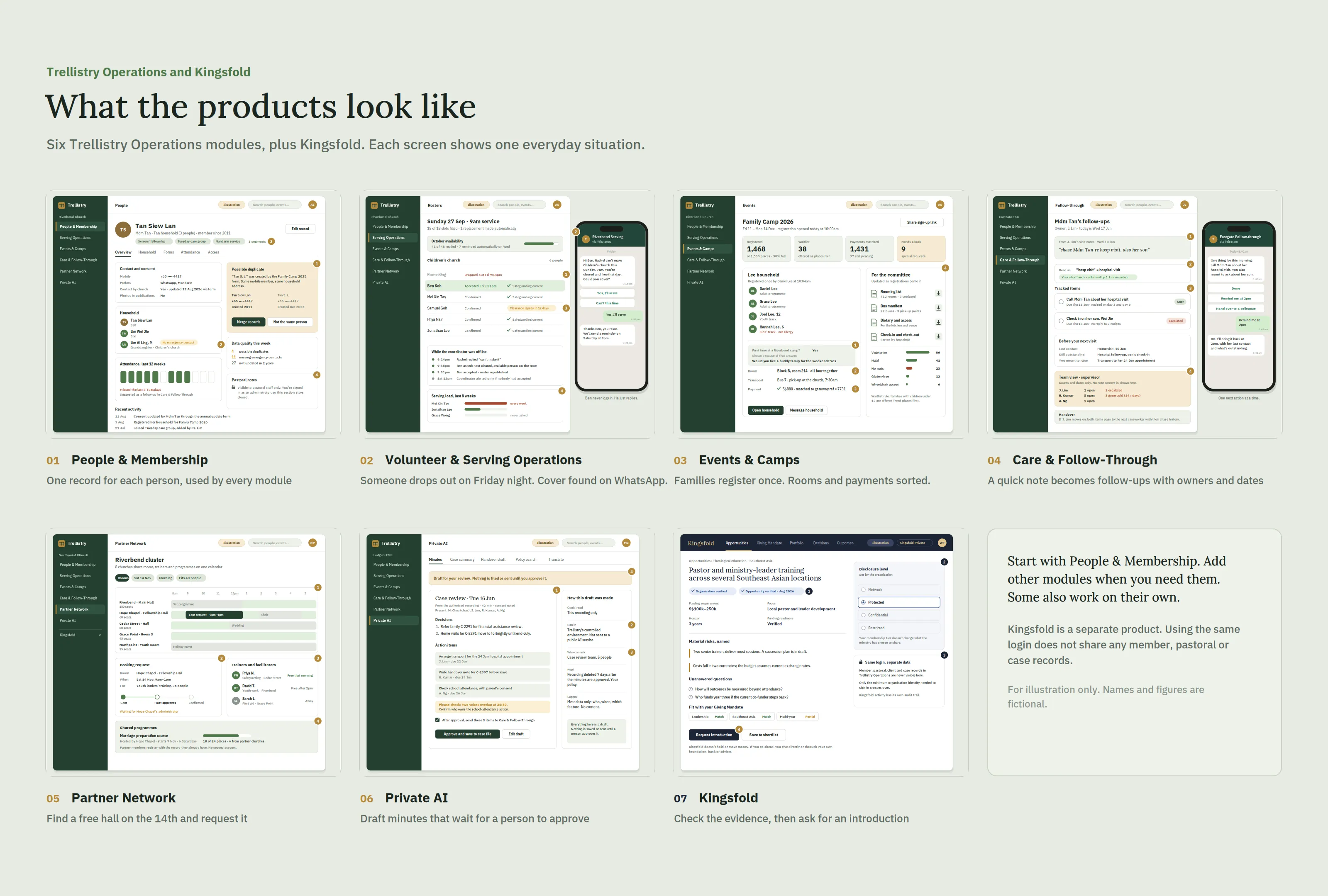
All seven Trellistry Operations screens on one sheet: People & Membership, Volunteer & Serving Operations, Events & Camps, Care & Follow-Through, Partner Network, Private AI, and Kingsfold.
For illustration only. Not a live screenshot. Names and figures are fictional.
01

People & Membership

One up-to-date record for each person. Every other module uses it.
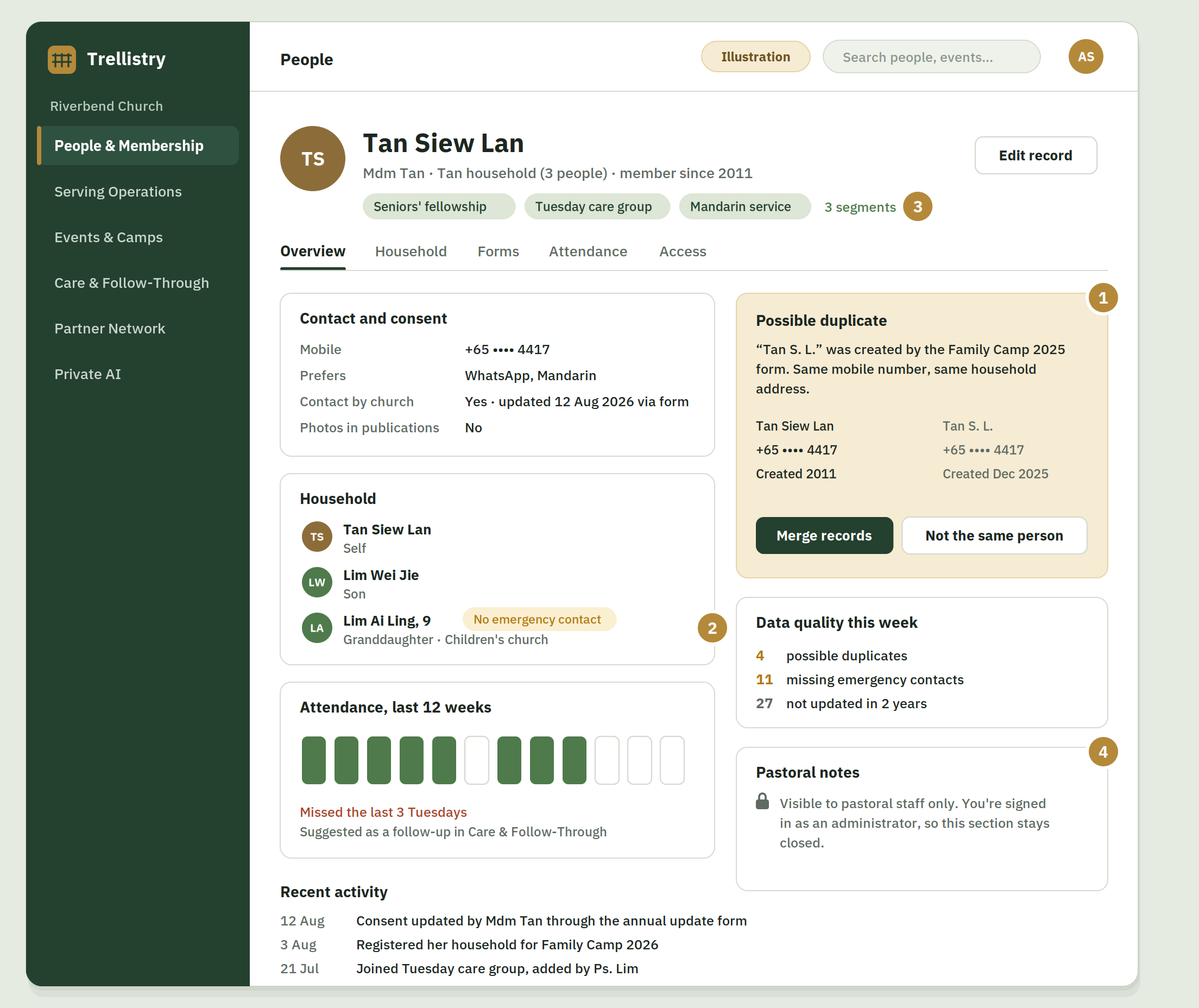
Person record for Mdm Tan, showing her household, consent settings, attendance, a possible duplicate record to merge, and pastoral notes that are locked for admin staff.

Monday morning, cleaning up the records

  1. A camp form created a second record for Mdm Tan. The system sees the same mobile number and asks before merging the two.
  2. Her granddaughter has no emergency contact. This is flagged before the children's outing.
  3. Update her record once and every list she is on is updated too: care group, Mandarin service, seniors' fellowship.
  4. The admin can update her contact details but cannot open her pastoral notes.
For illustration only. Not a live screenshot. Names and figures are fictional.

What it does

  • Stores households, relationships, contact preferences and consent in one record
  • Segments people by group, ministry, life stage or attendance pattern for targeted messaging
  • Runs your own forms for sign-ups, consent and updates. They write straight back to the person record, so nobody re-types anything
  • Flags duplicates, missing contact details and stale records so your data stays usable
  • Controls who can see what, with role-based permissions down to field level

What it replaces

The master membership spreadsheet and the four out-of-date copies of it.

Price

Included with Core Access

People & Membership is the core record that every other module reads from. It's included with Core Access (from S$49/month).

Why not just keep using Google Sheets or Docs?

  • Copies drift. Someone downloads the sheet and edits their copy, and now there are two versions of the truth. Here there is one record, and every list uses it.
  • A shared link shares everything. Anyone with the link, or anyone it gets forwarded to, can see every column, including sensitive notes. Here permissions go down to individual fields, so an admin can update an address without seeing pastoral or case notes.
  • You can't see who looked. A spreadsheet doesn't tell you who opened a record. Here administrative access is logged.
  • Consent lives in someone's memory. Here consent and contact preferences sit on each person's record, and every module respects them.

Personal data stays in our controlled environment and is never used to train AI models. How we handle your data →

02

Volunteer & Serving Operations

Rostering that chases people so your coordinator doesn't have to.
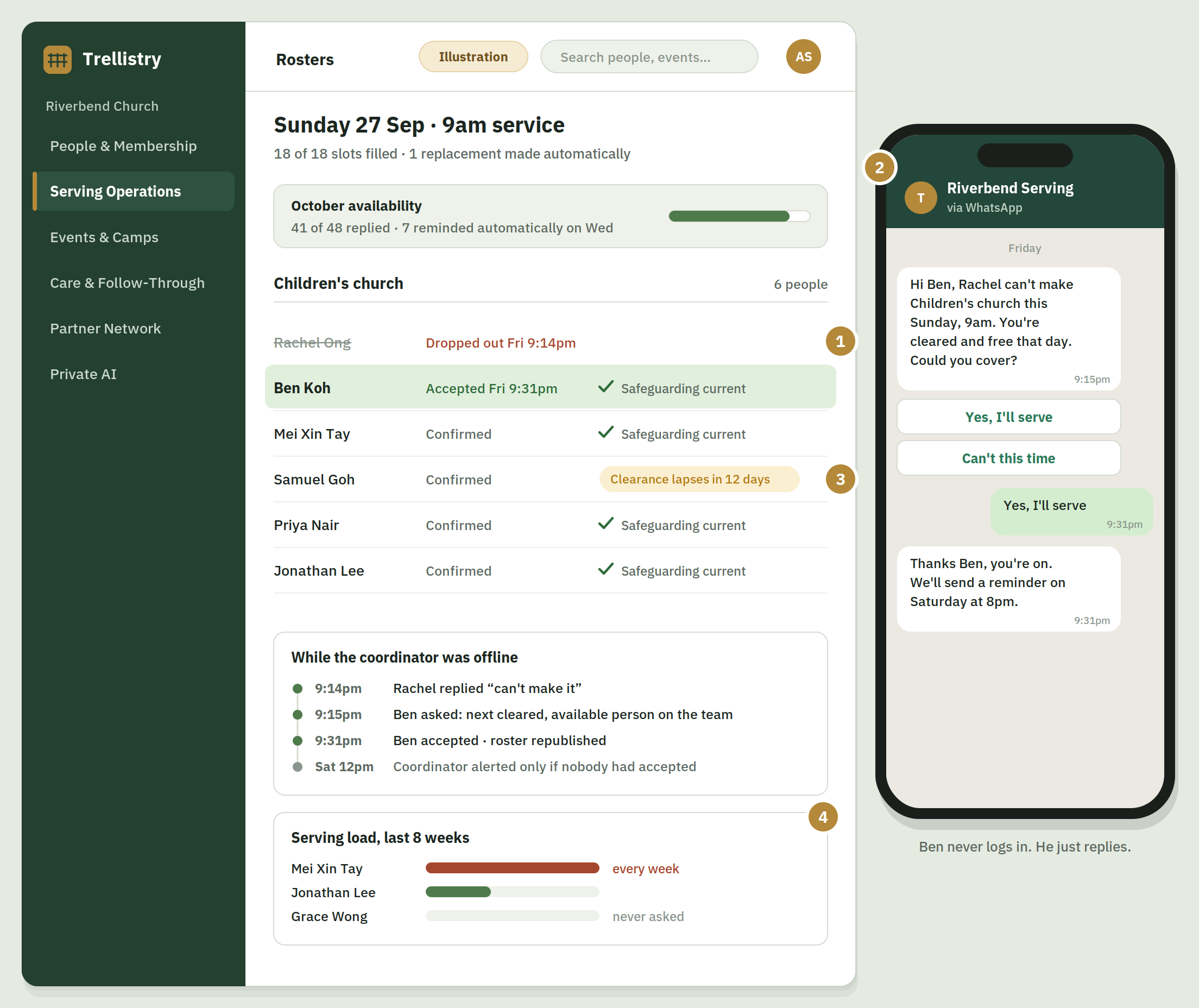
Sunday roster for the Children's church team, showing an automatic replacement, each volunteer's safeguarding status, a timeline of what happened overnight, and a WhatsApp chat where a volunteer agrees to cover.

Friday, 9.14pm. Someone drops out.

  1. Rachel replies on WhatsApp that she can't make it on Sunday. No need to call around.
  2. The system asks the next person on the same team who is free and cleared to serve. Ben says yes 17 minutes later.
  3. Only people with valid safeguarding clearance are asked. Samuel's clearance expires soon, so it is flagged now.
  4. Your serving policies are applied automatically: nobody is over-served, no one is double-booked across ministries they serve in, and both parents of a very young child are never rostered at the same time. The coordinator only steps in if nobody accepts.
For illustration only. Not a live screenshot. Names and figures are fictional.

What it does

  • Collects availability over WhatsApp, Telegram or Facebook Messenger — whichever your people already use — with automatic reminders to non-responders
  • Builds and publishes rosters against your own rules — team, ministry, frequency, blackout dates
  • Sends confirmations and shift reminders automatically before each serving date
  • Finds and requests a replacement from the same team when someone drops out
  • Keeps serving history per person, so you can see who is over-serving and who has never been asked
  • Escalates to the coordinator only when automation can't resolve it

What it replaces

The roster spreadsheet plus the WhatsApp group where nobody replies.

Proof point

Built and run inside a 2,500-member Singapore church — using the Serving Operations and Events & Camps modules — before it was offered to anyone else. That live deployment allocated 2,546 serving slots, engaged 490 parents at a 69% response rate, and sent 14,121 automated messages. Roughly 200 hours a month (about 7 hours a day) of manual coordination avoided.

Price

From S$79/month

Safeguarding clearance is the up-to-date vetting that qualifies someone to serve with children or vulnerable people — the working-with-children background check your policy requires. Trellistry tracks each person's status, only asks those who are cleared, and flags clearances before they expire.

03

Events & Camps

Everything that happens after the registration form is submitted.
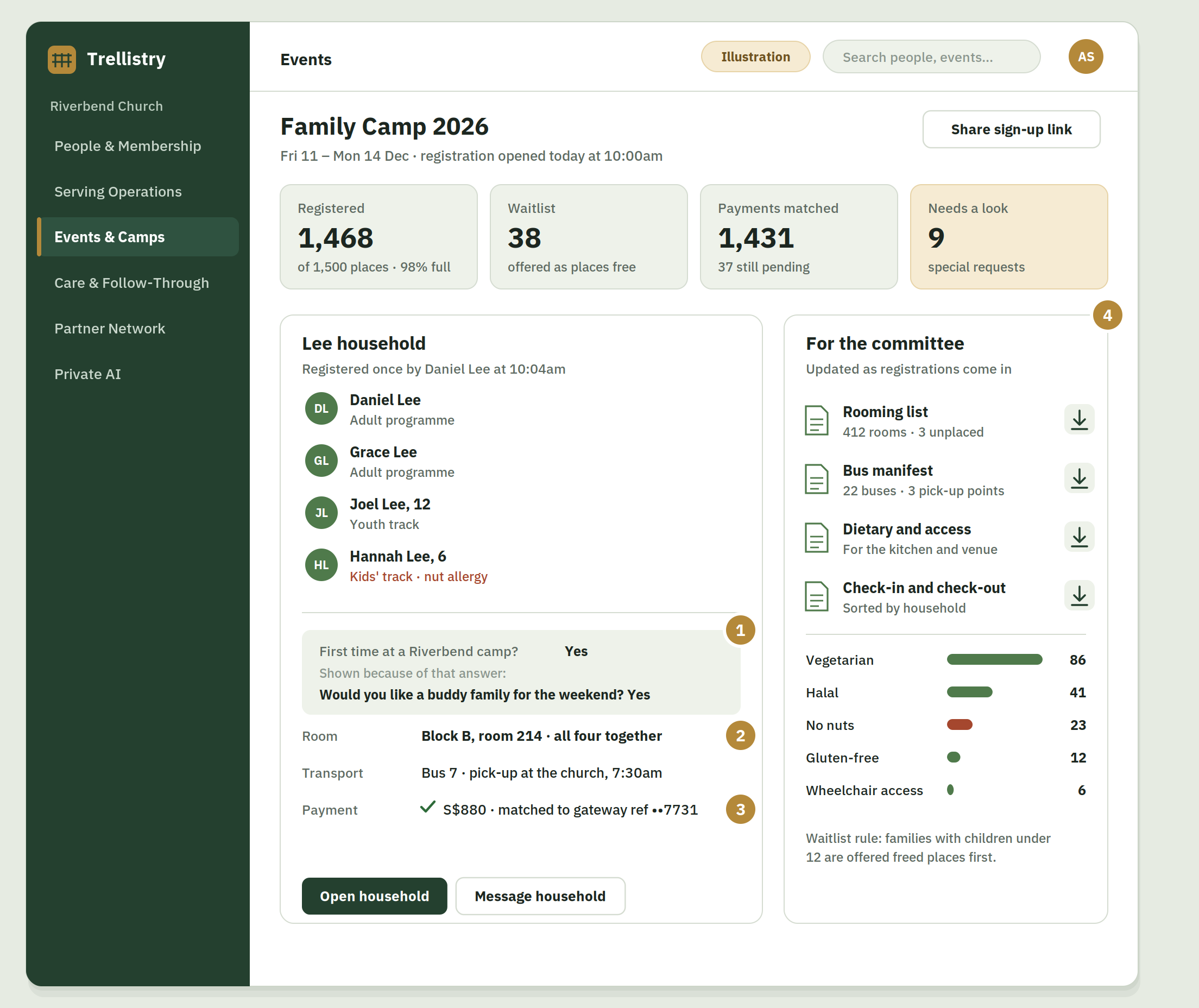
Family camp dashboard, showing registrations against capacity, one family registered together with their room, bus and matched payment, and lists ready for the committee to download.

Camp registration opens at 10am

  1. One parent registers the whole family in one go. First-timers get one extra question.
  2. The Lee family is placed in the same room automatically.
  3. Payments are matched against your payment gateway. No more checking transfer screenshots.
  4. The rooming list, bus list, dietary summary and check-in list are ready for the committee.
For illustration only. Not a live screenshot. Names and figures are fictional.

What it does

  • Runs conditional registration — different questions by age, ministry, role or first-timer status
  • Groups families and households automatically so they register once and are placed together
  • Tracks payment status and reconciles against your own payment gateway account
  • Enforces capacity limits, waitlists and priority rules without manual sorting
  • Collects and reports transport, rooming, dietary and accessibility needs in one place
  • Produces the rooming list, transport manifest and dietary summary your committee currently builds by hand

What it replaces

The Google Form, the payment tracking sheet, and the camp spreadsheet nobody wants to own.

Proof point

One camp deployment supported ~1,500 campers, with over 50% reduction in administrative workload and registration approaching capacity within two hours of opening.

Price

From S$79/month

04

Care & Follow-Through

Makes sure the person who most needs a call actually gets one.
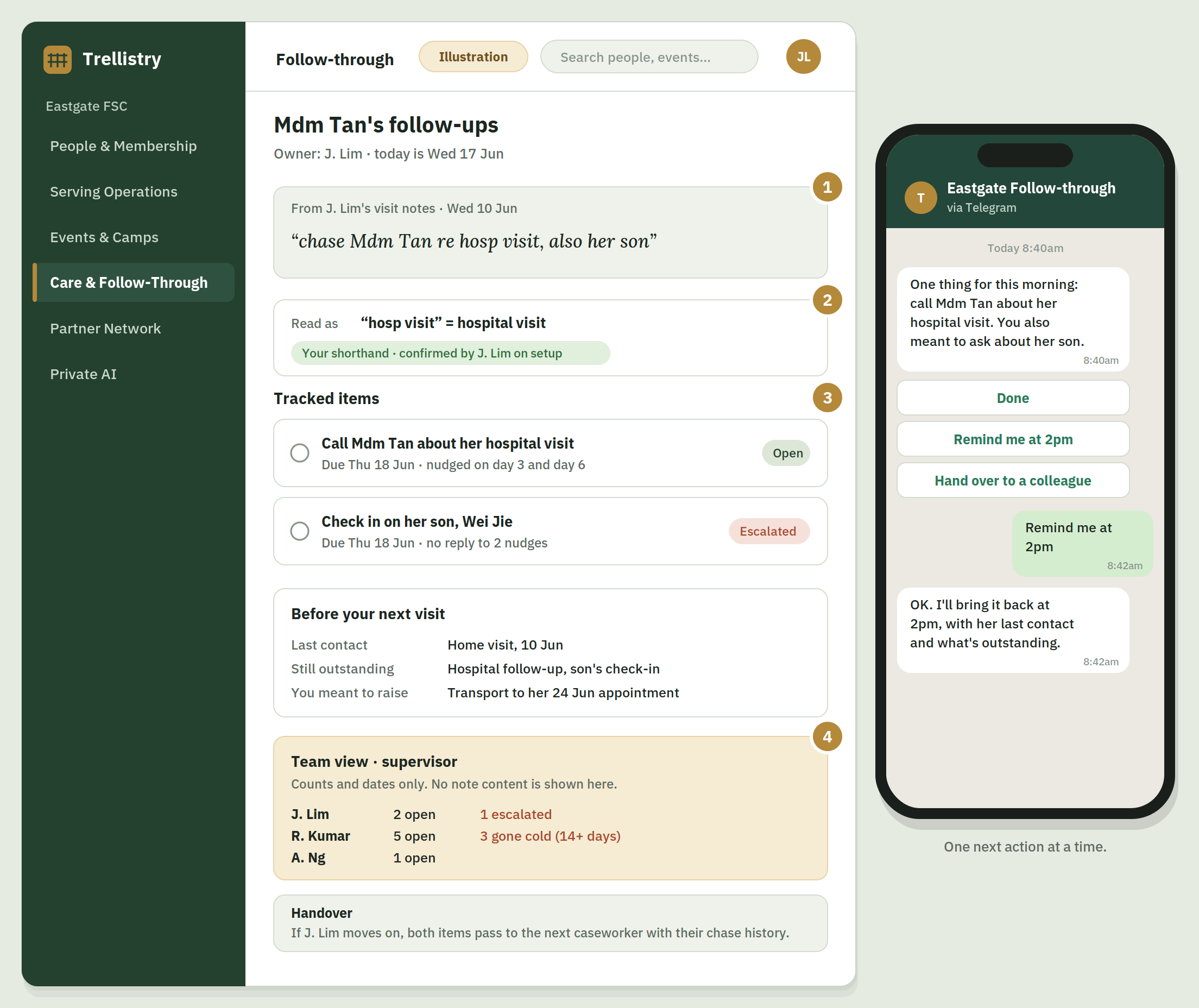
A caseworker's short note turned into two follow-ups with owners and due dates, with a summary before the next visit, a supervisor view showing counts only, a handover note, and a phone reminder.

One line in a home visit note

  1. After a home visit, the caseworker types a quick note as usual.
  2. The system knows "hosp visit" means hospital visit, because the team confirmed this shorthand during setup.
  3. The note becomes two follow-ups, each with an owner and a due date. Reminders go out one at a time on the caseworker's own messaging app.
  4. The supervisor sees what is overdue without reading anyone's notes. If a caseworker leaves, the follow-ups go to the next person with their history.

We recommend running Care & Follow-Through on Trellistry Private AI, because it reads your most sensitive notes. If your own policies allow it, you can connect your own AI provider instead. Works alongside your existing case management system.

For illustration only. Not a live screenshot. Names and figures are fictional.

What it does

  • Reads the places your team already writes: calendar entries, meeting notes and shared documents. It finds the commitments buried inside them
  • Learns your team's own shorthand and conventions during setup, shows you every rule it has inferred, and acts only on the ones you confirm
  • Turns "I said I'd call her back" into a tracked item with an owner and a date, without anyone breaking off to file it
  • Brings one next action at a time, on the channel your people already use. It picks a moment the person can act on, and keeps chasing until the item moves or is dropped
  • Assembles the picture before a visit, session or meeting: last contact, what is still outstanding, what you meant to raise
  • Works across a team: a supervisor sees what is owed and what has gone cold without reading the notes themselves
  • Keeps the follow-through record against the person's record, with a full access audit trail and your own retention and deletion rules
  • Runs read-only if you prefer: it changes nothing in your systems, checks whether you did it yourself, and keeps reminding you until you have

What it replaces

The mental list of people you keep meaning to call back, and the handover note that never gets written.

Price

From S$79/month

Where it runs is your choice. We recommend running Care & Follow-Through on Trellistry Operations · Private AI, because it reads your most sensitive notes. If your own policies allow it, you can connect your own AI provider instead, with your own account, and pay that provider directly. If you choose this, your provider's own retention and processing terms apply to that content, and our no-content-logging commitment covers only what runs on Trellistry. In social service and clinical settings this obligation is at its strictest, so the decision, and the trade-off, is yours to make.

Scope: This is not a clinical case management system and does not try to replace one. Where an organisation already runs one, Care & Follow-Through works alongside it.

05

Partner Network

Share halls, trainers and programmes with other organisations.
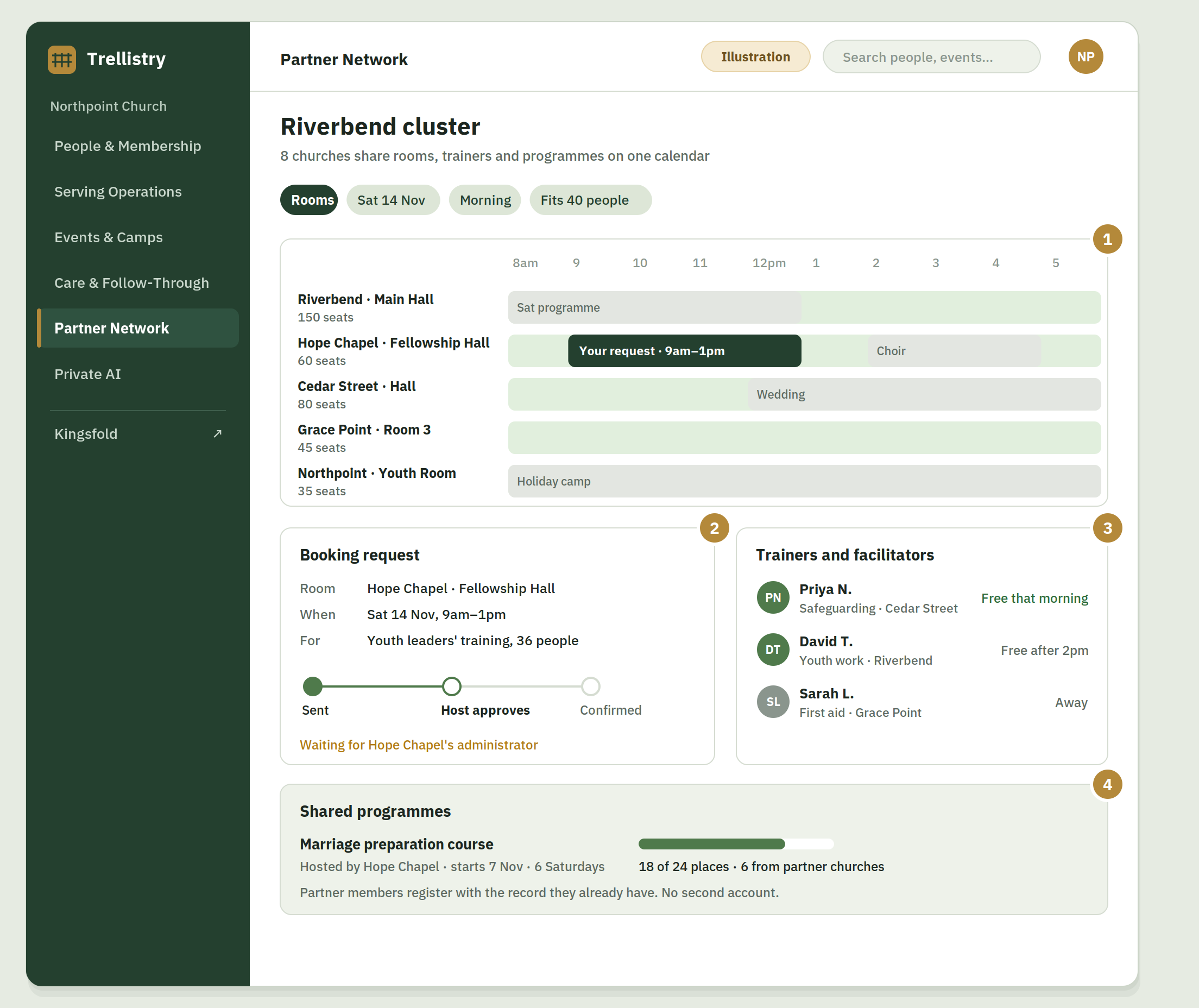
Shared calendar of halls across a cluster of churches on one Saturday, with a booking request waiting for approval, trainers available that day, and a course open to partner churches.

“Any hall free on the 14th?”

  1. Northpoint needs a room for youth leaders' training. The shared calendar shows which halls in the cluster are free.
  2. The request goes to the host church for approval. No long email thread.
  3. Cedar Street's safeguarding trainer is free the same morning and can be booked here too.
  4. Couples from partner churches can sign up for Hope Chapel's marriage course without creating a new account.

Eligible churches can also use Kingsfold with the same Trellistry account.

For illustration only. Not a live screenshot. Names and figures are fictional.

What it does

  • Lists your available spaces and lets partner organisations request bookings against a shared calendar
  • Shares a directory of trainers, speakers, facilitators and specialists across the network, with availability
  • Publishes courses, camps, conferences and training events that partner organisations can open to their own people
  • Lets a parent body or network administrator control who can see and book what — or run it open, if you prefer
  • Handles cross-organisation registration, so someone from one organisation can join another's programme without a separate account
  • Reports on what's being shared, so a central office can see where resources are going unused
  • For eligible churches, includes Kingsfold Organisation Access — same Trellistry account, no separate login. Kingsfold verification and listing are free to any eligible organisation either way.

What it replaces

The email chain asking whether anyone has a hall free on the 14th.

The vision

Most organisations sit on rooms, people and programmes that a peer nearby badly needs. The only thing preventing sharing is that there is no shared system. Partner Network is that system.

Price

From S$49/month

Single organisation S$49/mo · Cluster (up to 10) S$299/mo · Network/denominational from S$799/mo. See full pricing →

06

Trellistry Operations · Private AI

Use AI on your most sensitive material without sending it to an external service.
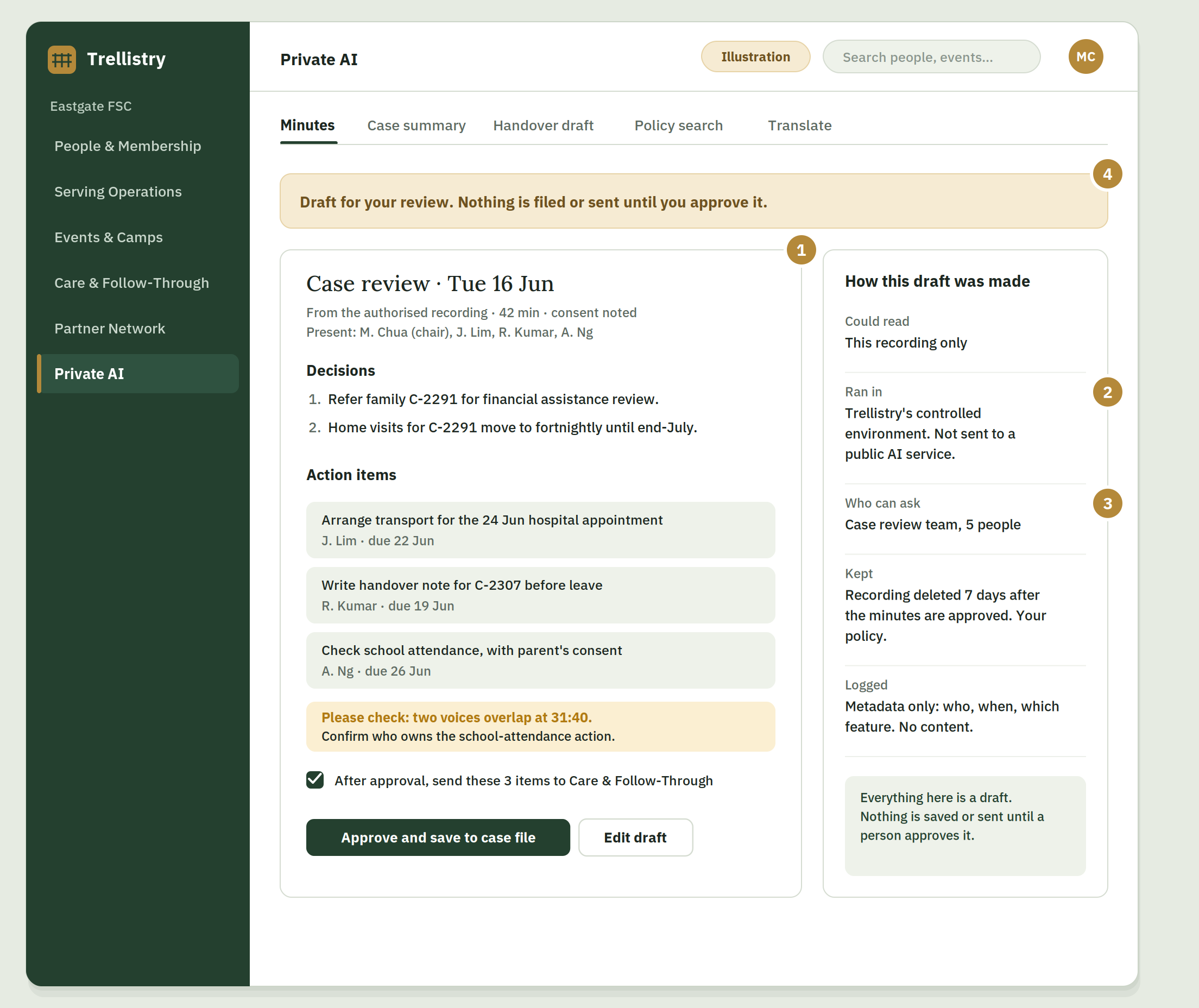
Draft meeting minutes waiting for approval, with one unclear point flagged for checking, next to a panel listing what the AI could read, where it ran, who can use it, how long data is kept and what is logged.

After the case review meeting

  1. The meeting was recorded with consent. The AI can only read this recording.
  2. The minutes are drafted inside Trellistry's own environment. Nothing is sent to a public AI service.
  3. Who can use it, and how long the recording is kept, follow your organisation's policy.
  4. Anything the AI is unsure about is flagged. Nothing is saved or sent until someone approves it.

It also drafts case summaries and handover notes, searches your own policies, translates, reconciles spreadsheets and drafts timetables.

For illustration only. Not a live screenshot. Names and figures are fictional.

What it does

  • Processes sensitive chats, case data and meeting summaries within our controlled environment — not sent to external AI services
  • Generates draft meeting minutes from authorised recordings: decisions, action items, follow-ups
  • Summarises case notes and drafts handover documents when staff change
  • Searches your own policies, handbooks and internal documents
  • Translates resources between languages
  • Reconciles and merges spreadsheets, generates timetabling drafts and reports
  • Every output is a draft for human review — the system does not send, file or act on generated content by itself

Every AI output is a draft for human review, never an authoritative record.

Three routes, by how much control you need

  1. Subscribe — a governed environment we run, with your policies applied. From S$79/month.
  2. Learn to run your own — build your own capability, on a server, workstation or the devices you already own. From S$3,500.
  3. We build and run it for you — customer-owned infrastructure, for organisations whose governance requires it. From S$25,000, quoted to scope, plus S$800–1,500/month.

Price

From S$79/month

See full Private AI page →

Easy for your team to use.

  • Role-based home screens. A volunteer coordinator, a pastor or caseworker, and an administrator each land on a different view showing only what they need
  • The numbers a leader actually asks for, on one screen, no report-building: attendance trend, serving load, upcoming camps, open follow-ups
  • Filter and export anything you can see. Nothing requires a query language or a support ticket
  • Users never need to log into a dashboard at all. They respond on WhatsApp, Telegram or Facebook Messenger
  • Designed to be usable on a phone, because that's where your users are
  • Every rollout includes hands-on training for your team, and we stay past go-live
See our training →
Leader Dashboard
127Active members
23Serving this week
4Follow-ups due
Due today
Overdue

Illustration only. Not a live screenshot. Names and figures are fictional.

Two ways to get started.

Start using Trellistry

Choose the modules you need and subscribe. Migration assistance, setup guidance, documentation, training and support are included.

No setup fee, no mandatory programme.

The three-month guarantee applies from day one.

See pricing
Optional

90-Day Operational Improvement Programme — S$3,800

For organisations with one operational problem expensive enough to justify us in the room. We baseline it, redesign the workflow, configure Trellistry around it, run a real cycle, and review outcomes after 90 days.

Most organisations don't need this. If your rosters live in one spreadsheet and you have a dozen volunteers, subscribe and we'll help you get set up — that's included.

Questions about which modules suit you?

Book a free 30-minute consultation. We'll tell you honestly whether Trellistry fits — and if one module is all you need, we'll say so.

Book a free 30-minute consultation